Built for market booths · Lightweight POS

Your booth's
pocket pal

From setup to packing up — one app handles it all.
No card terminal, no account binding, works offline at your booth.

BOO-POS mascot beagle

One phone
is your booth register

BOO-POS is a checkout tool built specifically for market booths.

Everything you need at your booth,
ready to go

Screenshots show the Traditional Chinese UI — the app interface supports ZH / EN / JA. Tap the coffee cup (SET) on the home screen → Language.

01
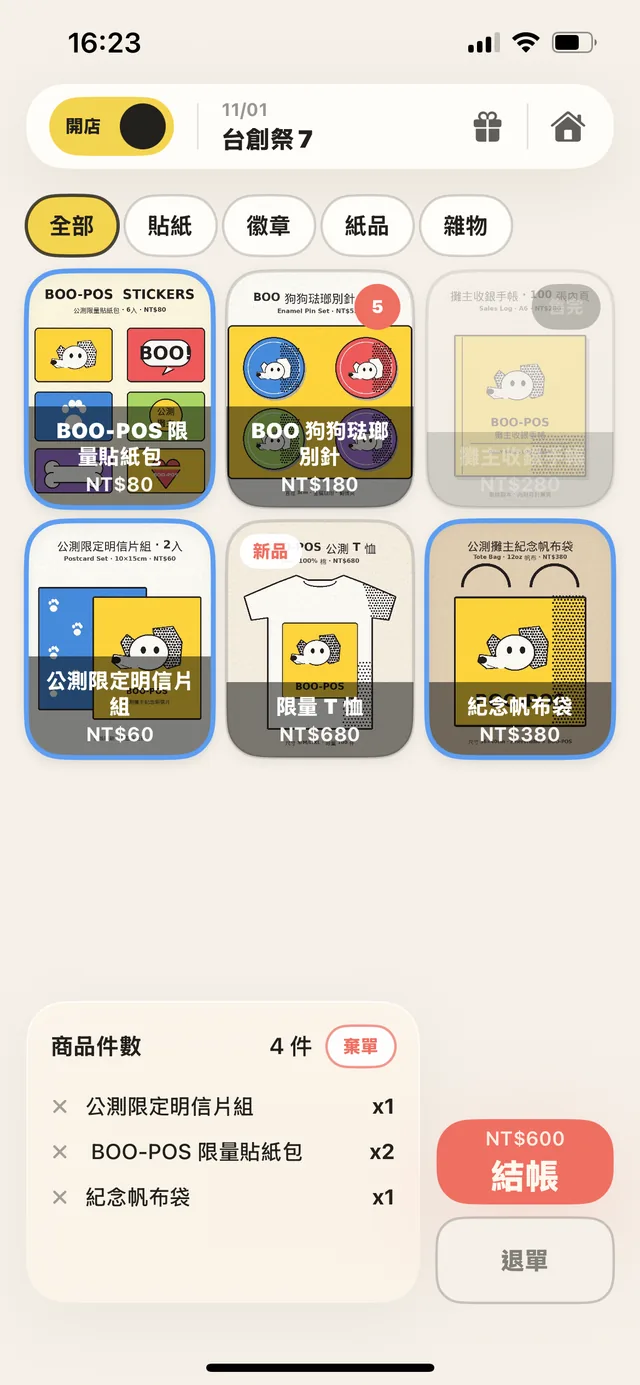
Product wall checkout screen
FRONT · Storefront

Three seconds to learn, tap to sell

From browsing to checkout — every step clear, nothing in the way.

Lay out products as a photo wall, swap categories, tap once to add to cart. While the customer is still looking, you're already ready to ring them up.

02
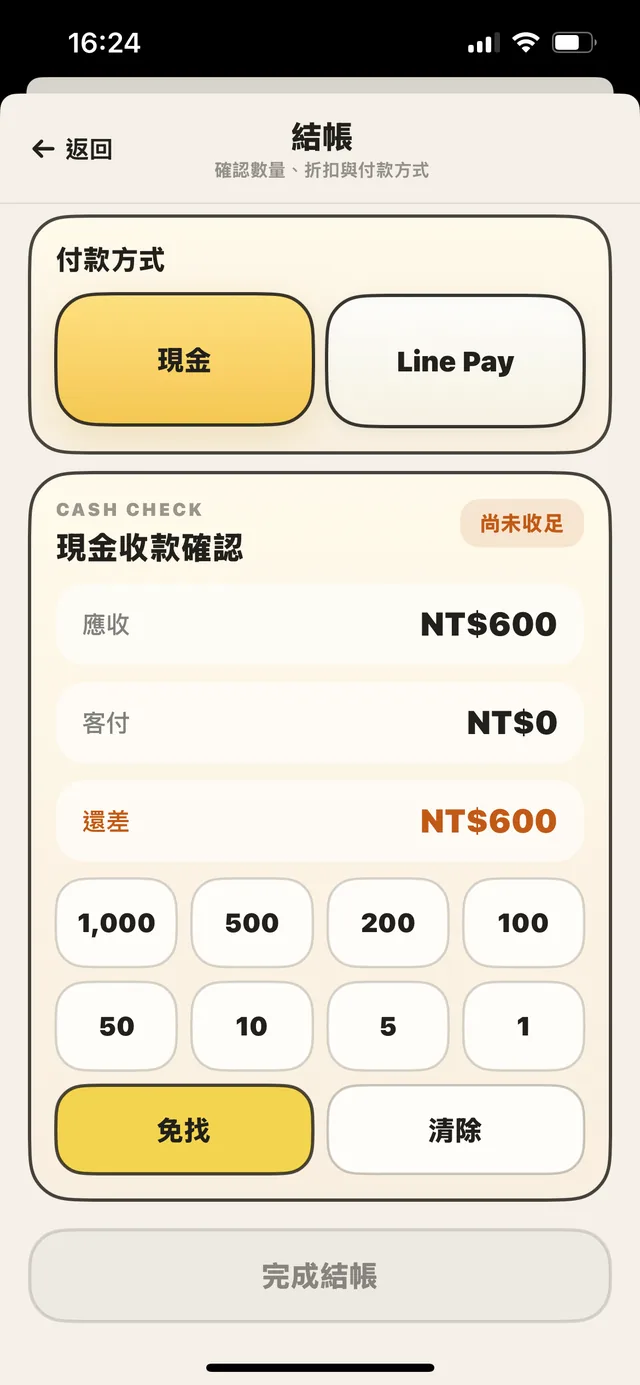
Cash change calculation screen
PAY · Payment

Cash change, calculated instantly

Denomination panel adds up; due vs. paid clear at a glance.

Enter what the customer hands over — the change appears on the spot. Tap denomination buttons to add them up. Even at peak hours, no fumbling, no miscounts.

03
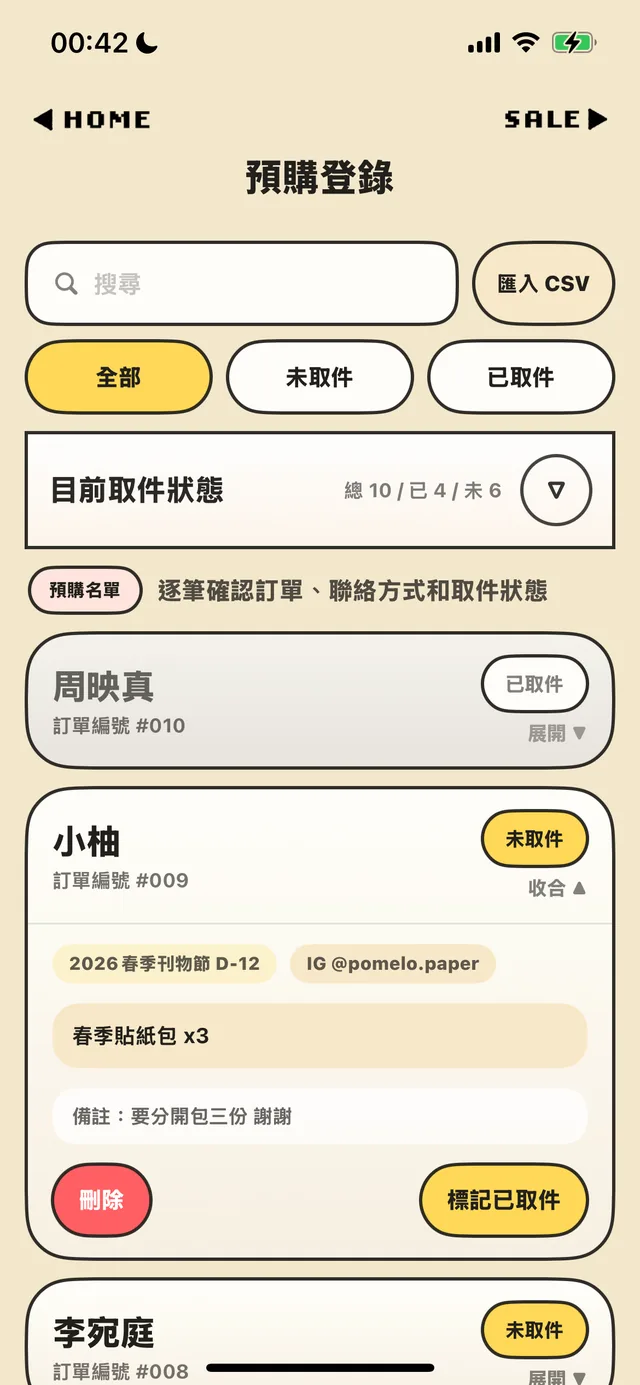
Pre-order pickup screen
PICKUP · Pre-orders

Take orders online, hand them out at the booth

One-click CSV import; toggle pickup status instantly.

Import your pre-order list as a CSV before the event, search by name on site, mark as picked up. Who got theirs, who hasn't — one glance and you know.

04
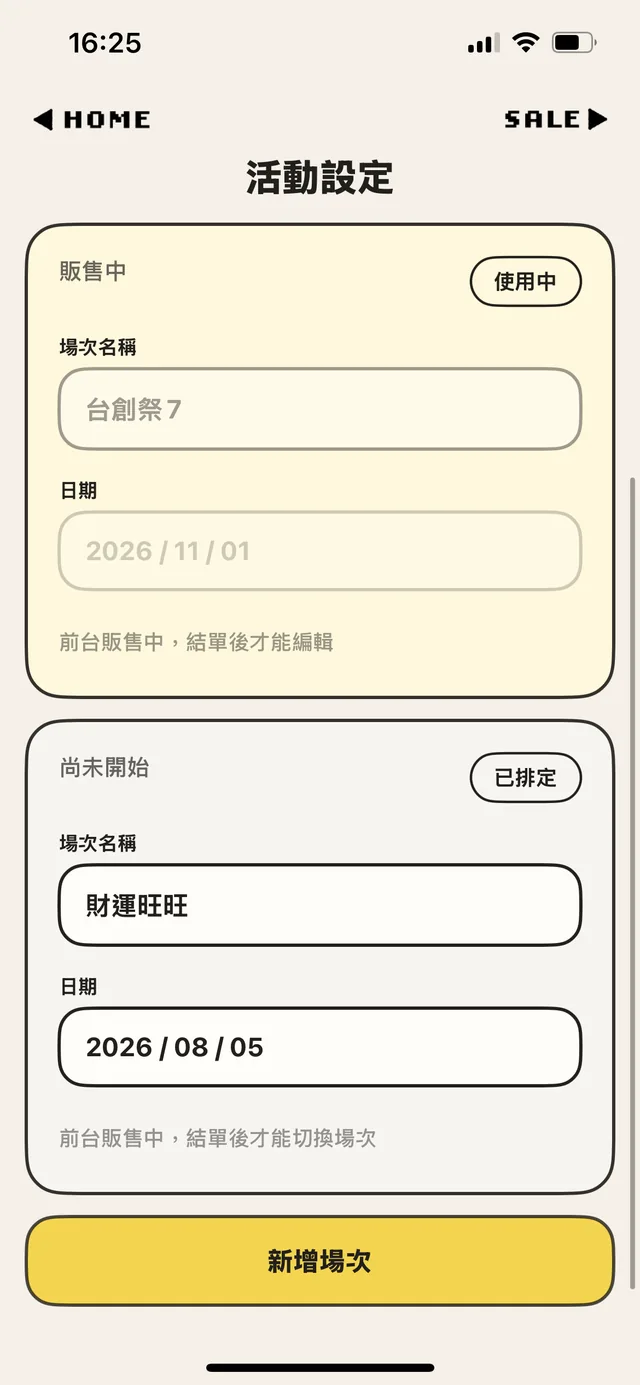
Event settings screen
EVENT · Events

Switch between markets on the fly

Schedule every event in one app, year-round.

One market this weekend, another next month — each gets its own event slot. Products and records stay separate, no resetting between, lined up clean all the way to year-end.

05
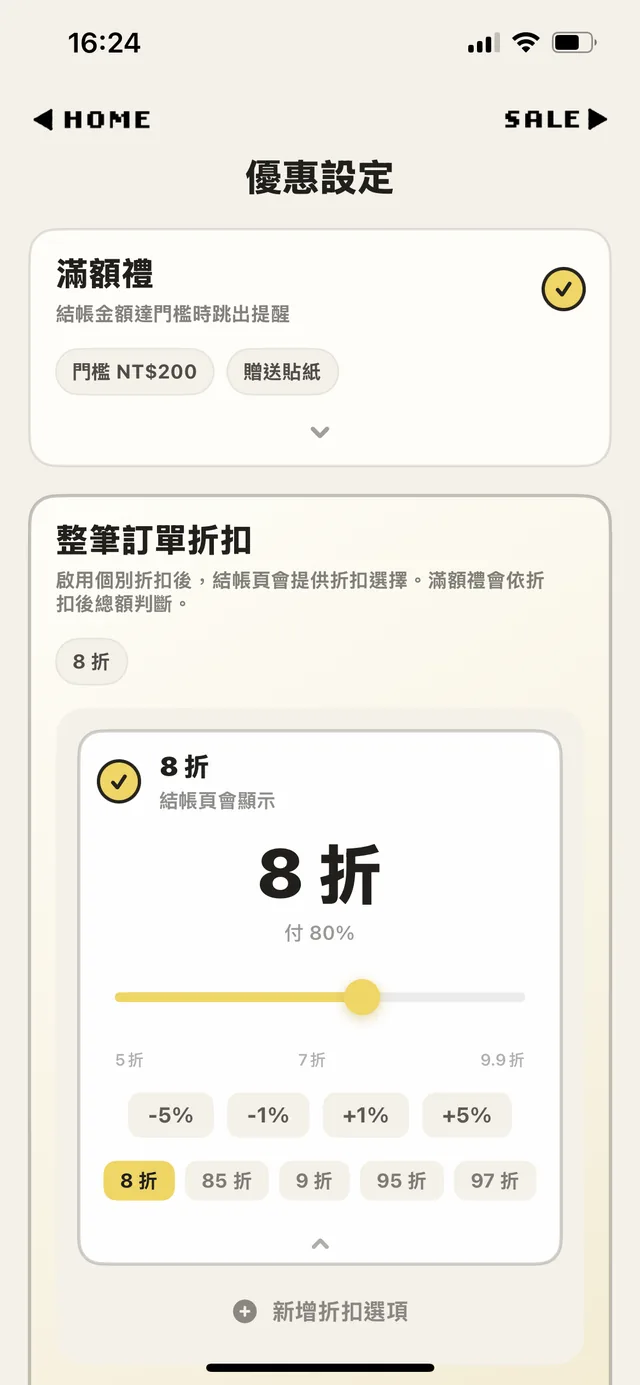
Promotions settings screen
OFFER · Promotions

Bundle gifts, set discounts

Never miss a freebie or a discount.

Set a spend threshold and the app reminds you to hand out the bonus gift at checkout; order-wide discounts apply in one tap. You set it up; the app remembers the rest.

06 BACKUP · Data Backup

Export backups, hand off to helpers

Take your inventory with you; no order lost on handoff.

Back up inventory and product data — product images included — to a file and share it with helpers. They import it and keep selling on their own phones. No re-uploading products, no cloud, more hands on the booth.

Seven modules, all in hand

StorefrontFRONT

Product photos as a wall, tap to checkout

InventorySTOCK

Quantity tracking; low-stock alerts

PaymentPAY

Quick change calc, customizable payment tags

PromotionsOFFER

Bundle-gift reminders; order-wide discounts

Sales RecordsRECORD

Every transaction logged automatically; easy to reconcile

EventsEVENT

Multiple events kept separate; no resetting between markets

Pre-ordersPICKUP

CSV import; verify pickups on the spot

BOO-POS mascot beagle

BOO, BOO!!

When you're running a booth on your own, things can get hectic fast.

You're still tracking sales with pen and paper,
and once the booth gets busy, it's easy to forget a bonus item or miss a special gift.

Sales records, change, freebies, discounts, inventory, pre-order pickups——
whether it's a big booth or a small one,
everything on the table is a piece of work someone stayed up day and night to bring to life.

And yet, there has never really been an intuitive booth POS app made specifically for creators.

Through my encounter with Vibe Coding,
I was finally able to turn an idea I had carried for a long time into a real app,
combining it with my own years of experience running booths at doujin events and markets.

BOO-POS = Booth + POS

The name sounds a little like a dog's bark,
and it took the shape of my favorite beagle.

I hope this little companion will continue to stay by your side
through every day you spend running your booth.

MUMU (ZINER STUDIO)

Version Updates

LATEST 2026.05.28

Multi-currency, multi-language UI, and bundle pricing — all live

Sell at overseas markets. Stop tallying bundle discounts in your head.

What's new

  • HKD / JPY / USD checkout Settings → Currency. Take foreign cash at overseas markets — no conversion needed.
  • Per-currency product pricing Switch currency to edit and display that currency's price.
  • Product bundle pricing Set tiered deals like "3 for $100" — the cart applies them automatically once it hits the threshold.
  • Manual checkout discount Enter on-the-spot promo amounts in one tap.
  • Cash numpad input Type the amount directly instead of tapping denominations.
  • ZH / EN / JA UI Settings → Language. Overseas customers and staff can use it right away.

Polish & fixes

  • iPad layout polish Larger type and reworked spacing on key screens.
  • Fixed: CSV export collision when two events share name and date.

Currency switching: existing events and orders keep their original currency. The switch only affects newly created events.
Bundle pricing note: if a helper is covering the booth, they need to set up bundle pricing on their own app for it to take effect.

See previous releases

This is the first release on record — once the next version ships, this one will be archived here.

What booth sellers ask most

Does BOO-POS cost anything?
BOO-POS is free to download. The core booth functions — checkout, payment, change — are unlocked from the start. The free plan supports up to 5 inventory items. To unlock unlimited inventory and the full feature set, it's a one-time NT$250 (~US$8) payment — no subscriptions.
I'm on the test build. What happens when the official version launches?
The test build (via TestFlight) has a 90-day expiry. Once the official version is on the App Store, downloading it directly continues from where you left off — same app, your data is preserved. Just to be safe, we still recommend backing up your inventory through the in-app backup before switching.
Does it work without internet at the booth?
Yes. Checkout, payment, change, and backup handoff all work offline. BOO-POS doesn't rely on cloud sync — it runs fully offline at your booth.
Is there an Android version?
An Android version is currently in development. For now, iOS is the only platform we recommend.
Can one phone handle multiple events?
Yes. Use Event settings to create separate market days; each event's products and sales records are kept independent, no need to reset between markets.
Can helpers use it too?
Yes. Back up your inventory and product data (product images included) to a file and AirDrop it to a helper — they import it and pick up checkout on their own phone. No re-uploading inventory, no internet needed. (File-based sharing, not real-time cloud sync.)
Who's BOO-POS for?
Market booths, craft fairs, handmade vendors, pop-up shops — any small seller who needs fast on-the-spot checkout without lugging a clunky register around.
Does BOO-POS process card payments or Line Pay?
No. BOO-POS is a record-keeping POS — no payment gateway integration. "Payment method" is a customizable tag — you can set up Cash, Line Pay, credit card, or any local payment option you use, and the app logs which method you took for each sale. The actual transaction still happens through your own Line Pay account, card terminal, or cash drawer.

Didn't find what you were looking for? Drop us a line at booposapp@gmail.com — or tap the dog bowl on the app's home screen to send feedback directly.

Ready to make
your booth lighter?

Free to download. NT$250 (~US$8) one-time unlock — no subscriptions.

DOWNLOAD ON THEApp Store
BOO-POS mascot beagle